

Tandem WOLED lasts longer when SDR stays under 150 nits

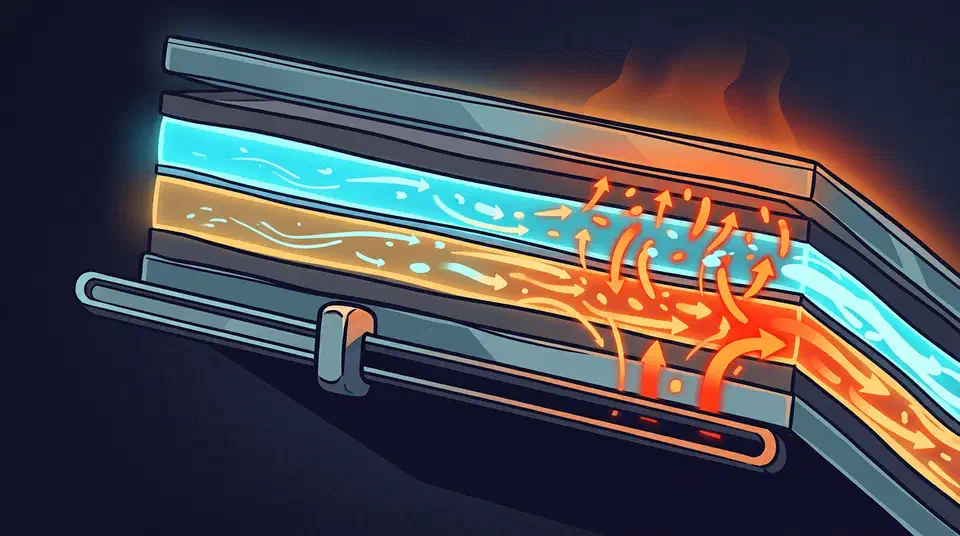
Tandem WOLED burn-in is a current density problem, and current density follows the brightness slider. Hold SDR output near 150 nits during long static work and you do more for the panel than every other habit combined.
Key Takeaways
- Panel wear follows current, and the brightness slider is what sets the current.
- Keeping desktop brightness near 150 nits is the one habit worth real effort.
- Blue subpixels wear almost twice as fast at 400 nits as at 200.
- Screensavers and burn-in fixer videos change close to nothing on a modern screen.
- Heat drives wear too, so airflow behind the screen beats another software trick.
Why a tandem stack lasts longer than single-layer OLED
A tandem panel stacks two emissive layers on top of each other, separated by a charge generation layer. Both layers light up together. To hit a given brightness, each one only has to work about half as hard as the single layer in an older panel. Samsung takes the same idea further with five stacked blue layers, reaching 1,300 nits on QD-OLED monitors. LG Display can also spend that headroom the other way, as its 27-inch 5K Tandem WOLED trades brightness for 220 PPI density.
That halving does most of the work. Current density means how much current gets pushed through one tiny emitter. The organic material wears out faster the harder you drive it. Split the job across two layers and each layer runs at a gentler operating point for the same picture.
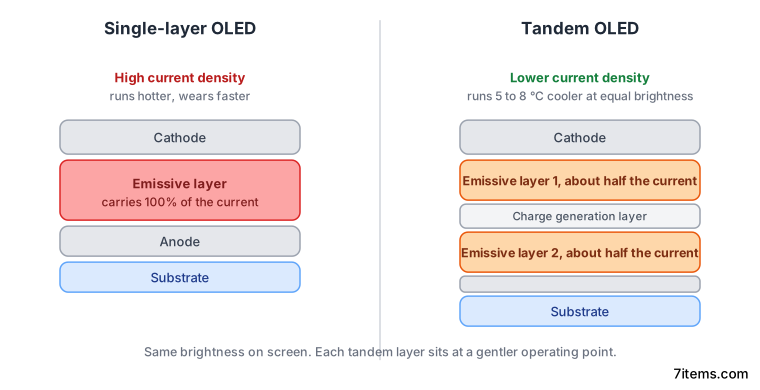
A lower drive current also means less heat. In KTC’s tandem OLED stress testing, tandem panels ran 5 to 8°C cooler than single-stack panels at identical brightness. Heat accelerates the chemistry that degrades the emitters, so a cooler panel ages more slowly even at the same runtime.
LG Display’s tandem OLED page says the stack improves lifespan and brightness over conventional OLED, without putting a number on either. The numbers came when LG brought the technology to laptops: PC Gamer reported LG’s claim of triple the brightness and double the lifespan of current OLED screens. The doubled lifespan is the figure that bears on burn-in, and it is a vendor design claim rather than an independent long-run measurement.
For independent data you have to look sideways at televisions. RTINGS ran more than 100 sets for three years, past 10,000 hours each. Brightness losses ran from 20 to 50 percent across the field. The best LG panels held within 10 to 18 percent. Those are single-stack sets, so a tandem desktop panel should do better than that. Nobody has published a decade of owner data on tandem monitors yet.
Does brightness cause OLED burn-in?
Yes, and more directly than anything else you control.
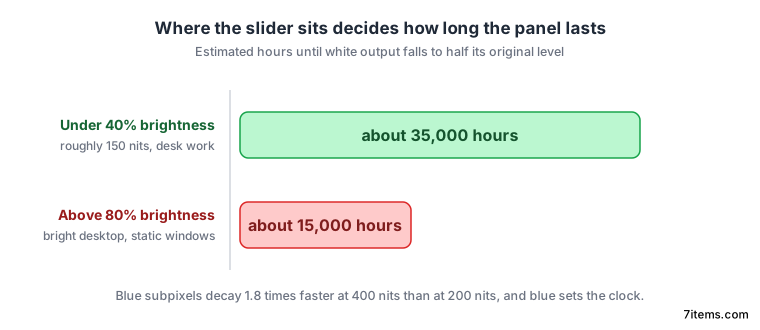
Push a panel from 200 nits to 400 nits and the blue subpixels decay 1.8 times faster. That figure comes from a display engineering breakdown of OLED wear. Blue already degrades two to three times faster than red and green, so blue sets the clock for the whole panel. The same analysis puts a screen held above 80 percent brightness at roughly 15,000 hours to half-brightness. Kept inside 40 percent, the same screen reaches about 35,000 hours.
Those hours do the most harm when they land on the same pixels. A taskbar lit at 400 nits for eight hours a day is a different load from a game running at 400 nits for two. The game keeps moving its bright pixels around. The US Department of Energy’s OLED stress testing on lighting panels pointed the same way years ago: light output decay follows drive current and temperature together.
HDR worries people more than it should. Its peaks are brief and cover a small slice of the screen, which is how a 1,500-nit rating gets measured in the first place. Thermal imaging shows those highlight regions spiking to around 55°C for a few seconds at a time. A bright SDR desktop does far more damage, because it holds a moderate load on the same fixed pixels for hours. That split between a brief peak and a sustained full-screen load is the gap that certified full-screen brightness now pins down. Where OLED sheds that sustained output, a backlit panel holds the full screen.
Keep one picture mode for desk work with SDR luminance near 150 nits. Save a separate profile for games and film, where you can open the slider up. Some gaming OLEDs spend brightness the other way: Asus’s ELMB motion mode dims the panel on purpose to cut motion blur. KTC’s tandem lifespan audit recommends conservative brightness before anything else on its list.
Ranking the Tandem WOLED burn-in advice by real effect
Most burn-in guides hand you eight tips as though they carry equal weight. Rank them by how much they move current density and most of them fall to the bottom.
| Habit | What it changes | Effect on panel life |
|---|---|---|
| Lower SDR brightness | Current through every lit subpixel | Large |
| Dark theme for large static areas | Lit subpixel count and average current | Large |
| Auto-hide bright persistent UI | Hours a fixed bright region stays lit | Moderate to large |
| Let compensation cycles finish | Wear evening across subpixels | Moderate |
| Pixel shift and logo dimming | Edge position of static elements | Small |
| Screensaver on a screen that already sleeps | Nothing the sleep timer was not already doing | None |
| Burn-in fixer videos | Perceived uniformity, briefly | None |
Dark themes help in two ways. Fewer subpixels are lit at all, and the ones that are lit draw a lower average current. A dark editor at 150 nits is a gentler load than a white document at the same setting.
Compensation cycles even out accumulated wear, but they do it partly by dimming the pixels around a worn region instead of restoring the worn ones. You are trading a little global brightness for uniformity. Interrupting the cycle is still worse than running it. Many warranties exclude claims when the internal log shows the screen was powered off during scheduled maintenance. Leave it in standby overnight rather than pulling the plug.
How to measure what your panel is doing
The number in the on-screen menu is a percentage of whatever that picture mode can reach, so it tells you nothing in nits. That mapping changes with the model, and it changes again when you switch between SDR and HDR or between preset modes on the same screen. Two monitors both reading 40 can differ by 80 nits. The reading also shifts with how much of the screen is lit, the APL brightness curve that governs every OLED.
To get the real figure you need a colorimeter reading white luminance in candelas per square metre, which is the same unit as nits. Cheap units are accurate enough for a target this coarse. Display a full white field, put the sensor on it, and read the number.
Record three things: your working picture mode, the on-screen brightness value, and the measured white luminance. Then walk the slider down until the reading is near 150 and save that state as a profile you can switch back to.
Without a colorimeter, work in a dim room, open a mostly white page, and look at it for a minute. If it feels like staring into a lamp, you are above 150 nits and the panel is paying for it. Setting brightness to match the room around you lands you close to the setting that keeps the panel alive longest.