

Stop VRR flicker on OLED monitors with a steady frame rate


OLED VRR flicker comes from gamma tuned for one refresh rate. Variable refresh keeps moving off that mark, so the brightness shifts. TFTCentral measured an 11-step RGB jump on a near-black shade during a full 480Hz to 10Hz swing. Dark scenes and loading screens show it first.
Key Takeaways
- OLED brightness is tuned for one refresh rate, and VRR keeps moving off it.
- Near-black scenes and loading screens show the flicker first.
- WOLED gets brighter as frame rates drop; QD-OLED just flashes at random.
- Anti-flicker modes shrink the swing but never remove it.
- Holding a steady frame rate helps more than any monitor setting.
What causes VRR flicker on OLED monitors?
An OLED panel tunes its gamma response for one fixed refresh rate, usually the panel’s native maximum. Variable refresh rate keeps moving the refresh rate away from that point. The gamma drifts with it, the subpixels overcharge or misfire, and the brightness shifts. The clearest measurements come from TFTCentral’s OLED VRR flicker testing.
Older LCDs flickered for another reason: PWM dimming switched the backlight on and off. An OLED has no backlight, so the symptom looks similar but the cause differs.
Only change triggers it. A stable refresh rate, high or low, produces no flicker, because the eye reads sudden or erratic gamma shifts as flicker.
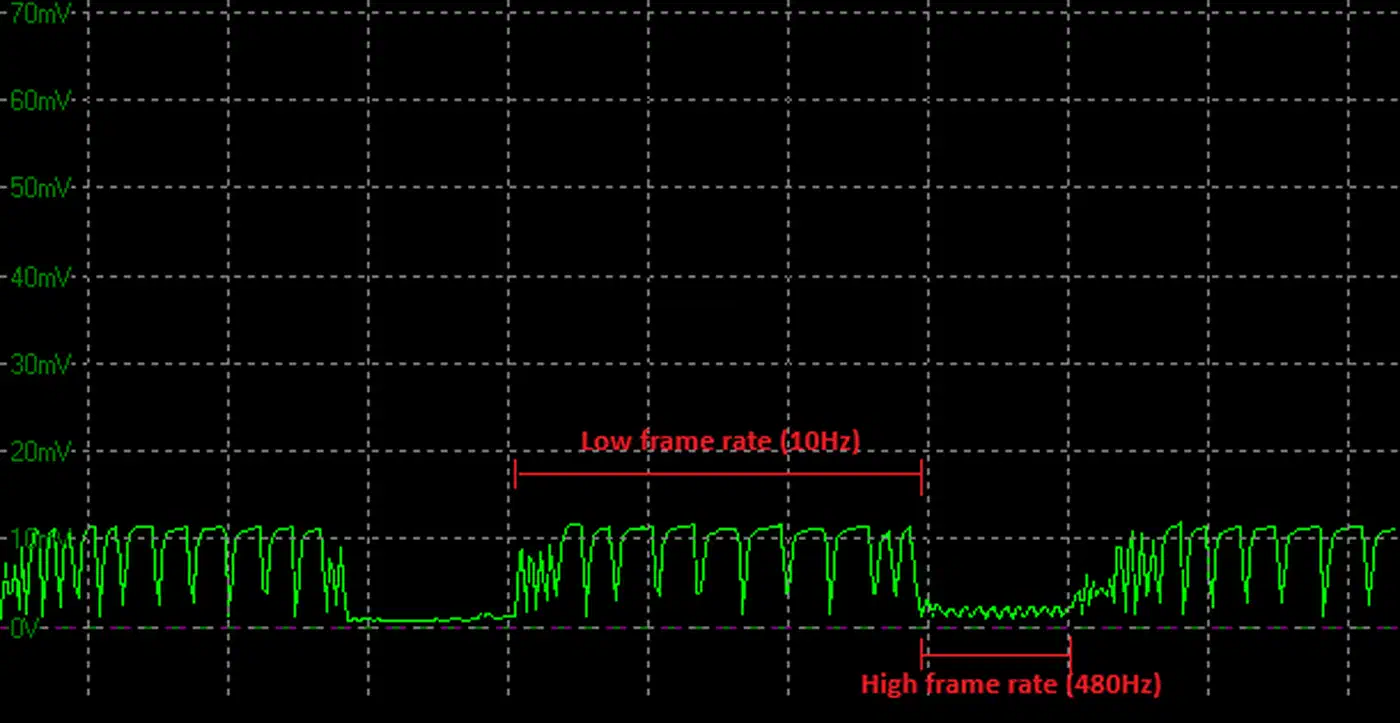
TFTCentral names six variables that decide how bad it gets: the screen, the graphics card, the game, the scene, the settings, and the frame rate you hit. That is why two owners of the same model can disagree: one person’s stress test may never show up in the games another person plays.
Low Framerate Compensation, or LFC, adds another source. When the frame rate falls below the VRR range, LFC multiplies frames to keep the panel inside it, and crossing that boundary causes a one-off gamma jump.
The first time I experienced flickering on my Alienware AW3423DW, I honestly thought I just got a bad panel. When I eventually replaced the panel because of a few dead pixels, I hoped I wouldn’t face the problem again, but the flicker was still there.
Why dark scenes flicker and bright ones look clean
Two separate effects stack in dark content. On the Asus ROG Swift PG27AQDP, a full 480Hz to 10Hz swing moved the darkest shades the most, per TFTCentral’s testing.
| RGB shade | RGB change during a 480Hz to 10Hz swing |
|---|---|
| RGB 5 (near black) | 11.0 |
| RGB 10 | 9.3 |
| RGB 20 | 5.3 |
| RGB 50 | 4.0 |
| RGB 100 | 1.8 |
| RGB 200 | 2.3 |
Your eye makes it worse. A five-step change between RGB 5 and RGB 10 stands out far more than the same five steps between RGB 200 and RGB 205. Human vision is more sensitive to change in low light, so the panel misbehaves most where you are best at noticing it.
Room lighting plays a part too. A dark room makes near-black shifts easier to see, so the same scene flickers more at night than in daylight.
Loading screens get blamed for a reason: they pair a mostly static dark image with wildly unstable frame rates, which is the worst case. TFTCentral’s advice is to get past the loading screen before you judge a monitor. In practice, menus, night scenes and loading screens are where to look, while bright daytime gameplay usually looks fine even on a screen that measures poorly.
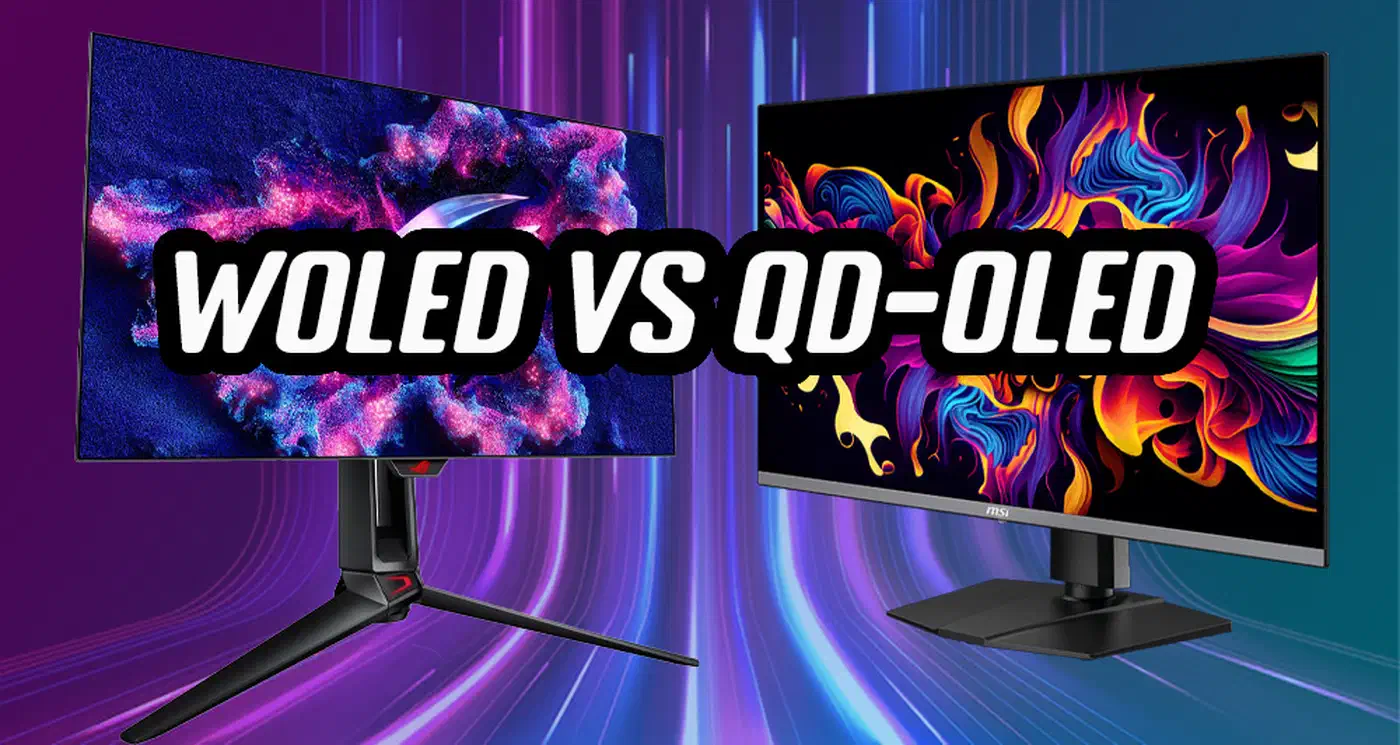
WOLED and QD-OLED flicker in two different ways
The two panel types behind most OLED gaming monitors misbehave by different mechanisms, and the advice changes with each. Few buying guides mention it.
On WOLED, gamma is tied directly to the active frame rate. Lower the frame rate and dark content gets brighter. On the Asus PG27AQDP, RGB 5 at 480fps climbs to RGB 16 at 10fps. The size of the frame-rate swing sets the severity.
- A 480Hz to 10Hz swing measured 11 RGB steps.
- A 480Hz to 300Hz swing measured 6 steps.
- A 480Hz to 400Hz swing measured only 3 steps.
The higher the ceiling, the wider the possible swing, and 480Hz WOLED is no longer rare. LG’s 32GS95UE reaches it once its dual mode drops the panel to 1080p.
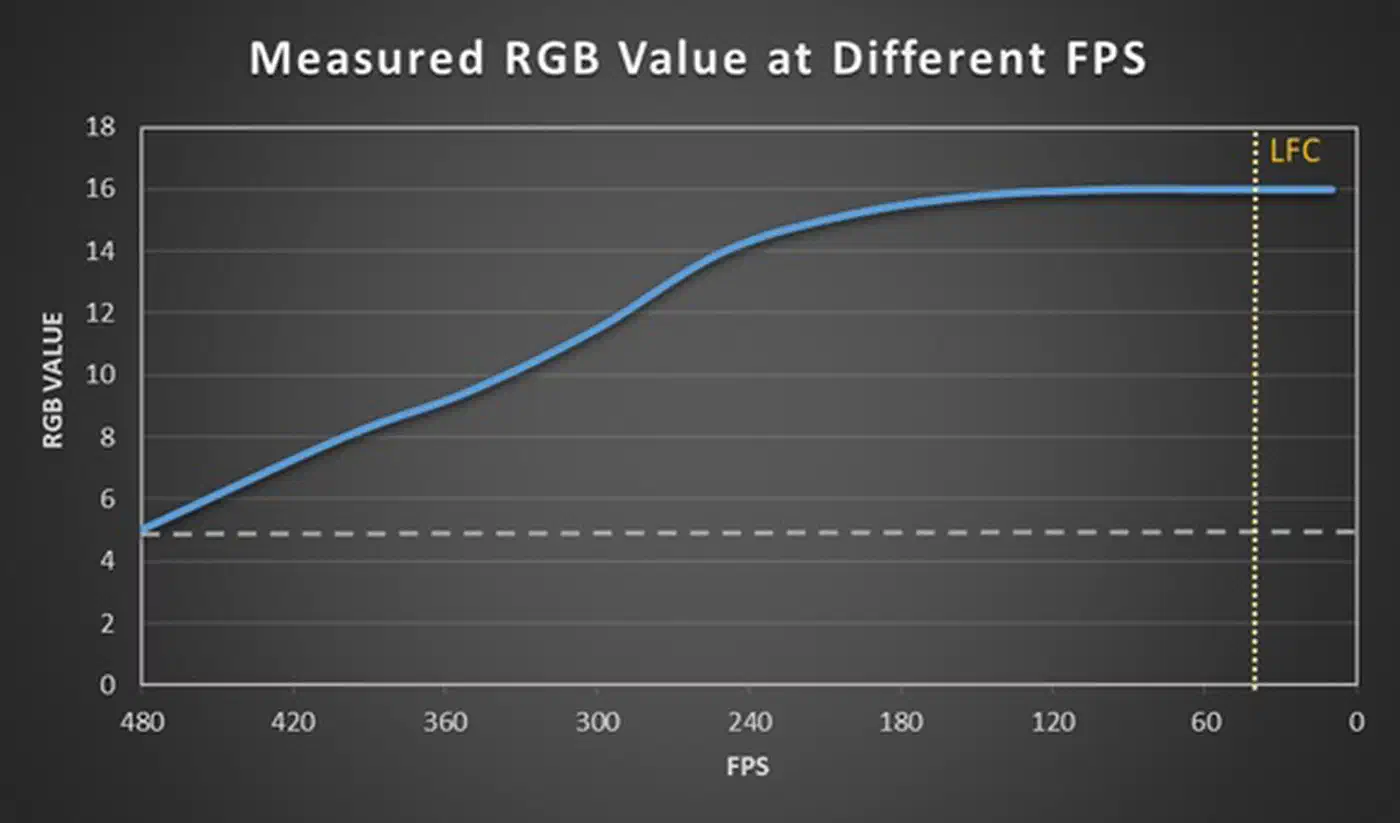
WOLED has a side effect: capping your frame rate well below the native refresh rate parks the panel at the wrong gamma. That raises blacks and washes out shadow detail even when nothing is flickering.
QD-OLED gamma does not follow the frame rate. A static RGB 5 image measures RGB 5 at a steady 240fps and stays RGB 5 at a steady 10fps. So capped frame rates do not raise blacks the way they do on WOLED.
Instead, QD-OLED throws short spikes and flashes at seemingly random points across the refresh range, brighter or darker. The amplitude stays the same whether the swing is small or large. What changes is the frequency of the spikes, which rises as frame rates fall.
So the advice splits. WOLED owners chase consistency at any frame rate. QD-OLED owners chase consistency and height, staying near the panel’s maximum refresh rate, which the first 500Hz OLED pushes higher than any panel yet. TFTCentral’s sample size is small, so they call this a possible trend, and they note that two models from one brand can behave very differently.
TFTCentral ran SDR content with gamma set to 2.2, converted oscilloscope luminance readings into RGB values, and validated them against a spectroradiometer.
Do OLED anti-flicker modes help?
The anti-flicker mode in the OSD menu helps, at a cost. It shrinks the panel’s active VRR range so the frame rate cannot fall as far, which caps how far the gamma can drift.
On the Asus PG27AQDP at RGB 5, the mode clearly cut the swing:
| Anti-flicker mode | VRR range | RGB swing at RGB 5 |
|---|---|---|
| Off | 480 to 40Hz | 11.0 |
| Middle | 480 to 165Hz | 8.5 |
| High | 480 to 210Hz | 7.0 |
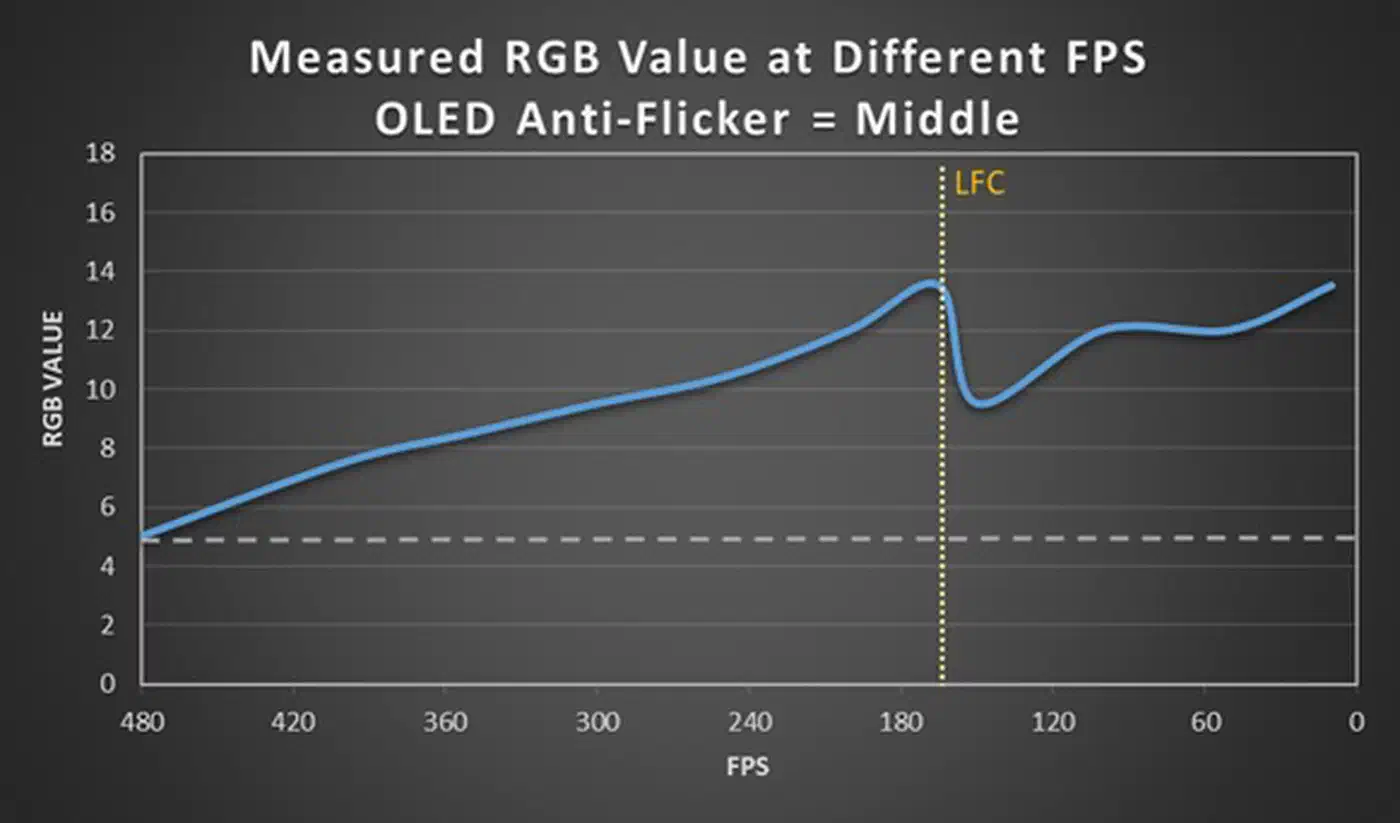
The modes also seem to apply some gamma compensation of their own. At 200fps the panel reached RGB 12 in middle mode against RGB 15 with the mode off.
The cost shows up at the bottom of the narrowed range. Below it, LFC takes over, and the LFC boundary produces a jarring RGB jump of its own. If your frame rate keeps crossing that edge, a narrow range with a hard edge can feel worse than the wide, gentle drift it replaced. Some panels add a “VRR dead zone” where neither VRR nor LFC runs. There is no flicker inside the zone, but you get the same jarring gamma change every time the frame rate crosses in or out.
Anti-flicker modes reduce the amplitude and leave the flicker in place. To pick one, you need to know roughly what frame rate you hold in the games you play.
Asus shipped OLED Anti-Flicker 2.0 on the PG27UCDM, and Samsung added a “VRR Control” option to the Samsung Odyssey G7 by firmware. Display Ninja notes that Samsung’s version mostly swaps flicker for micro-stutter or added input lag.
How to reduce VRR flicker on your own monitor
Each fix costs something. They run from the cleanest to the most fiddly.
Turn VRR off. That removes the flicker and brings back screen tearing, which V-Sync then fixes at the price of input lag. TFTCentral calls this the cleanest escape for anyone who already holds high, steady frame rates.
Hold a steadier frame rate. Lower a couple of game settings, or upgrade the parts that cause frametime spikes, so the refresh rate stops swinging in the first place.
Cap the frame rate slightly below the panel’s maximum refresh rate. Use the NVIDIA Control Panel limiter or an in-game cap. This stops frames from soaring and then collapsing, which is the swing that causes the flicker. On WOLED, watch the cost: a cap set far below native raises blacks and lifts shadow detail even as the flicker calms down.
Learn your panel’s VRR range and its LFC boundary, then pick a frame-rate target that stays clear of it. AMD publishes a reference table of monitor VRR ranges, and TFTCentral lists the range in every review. Consoles complicate this, because the Xbox and PS5 send VRR down different HDMI ports. On AMD cards there is a classic oscillation case: a 48 to 144Hz panel running at 47 or 48fps flips LFC on and off repeatedly, and that is when brightness pumps. Display Ninja’s fix is either to raise the frame rate above that boundary or to edit the VRR range with CRU.
None of this cures the problem, as the XDA writeup points out. Capping a 240Hz or 360Hz monitor to stop the flicker gives up some of what the panel was bought for: motion clarity, which black frame insertion chases from a different angle.