

Turn on BFI and the PG34WCDM clears OLED motion blur


Black frame insertion clears OLED motion blur on Asus’s ROG Swift PG34WCDM, where it ships as ELMB. Turn it on and the panel drops a black frame every 8.33ms, cutting the persistence blur that smears fast motion. In return it locks to 120Hz in SDR, needs variable refresh off, and dims the picture.
Key Takeaways
- BFI drops black frames between the real ones, so motion blurs less.
- It works cleaner on OLED than LCD because OLED pixels switch almost instantly.
- The picture gets dimmer, since black frames mean less light on screen.
- On the PG34WCDM it runs only at a fixed 120Hz in SDR.
- Turn it on for fast games where sharp motion beats a bright picture.
What is black frame insertion (BFI)?
Black frame insertion is a motion-blur-reduction mode that drops a black frame between each pair of real frames. The point is to fix persistence blur, the smear you see when fast motion moves across an OLED. Asus brands its version Extreme Low Motion Blur, or ELMB.
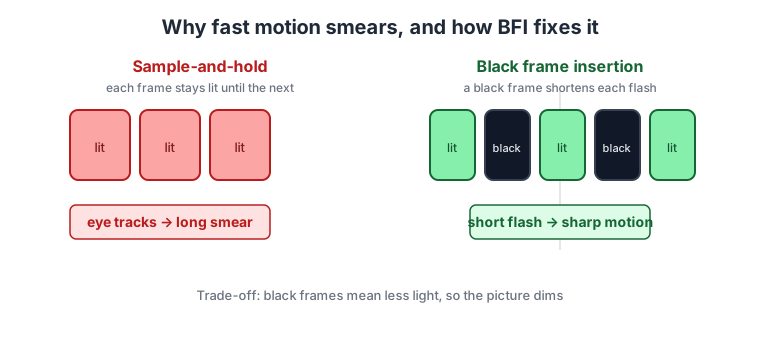
The blur comes from how the panel holds an image. An OLED lights each frame and keeps it lit until the next one arrives, a behavior called sample-and-hold. Your eyes track a moving object across that still, lit frame, so the image smears. Fast pixel response doesn’t fix this, because the pixel is doing exactly what it should: staying on.
BFI works differently. By inserting a black frame, it shortens how long each real frame stays lit, so your eye catches a shorter, sharper flash of motion instead of a long lit smear. A very high native refresh reaches the same result without dimming the screen, which is how the 500Hz Odyssey OLED G6 trims persistence blur by shortening each frame rather than blanking one. The RTINGS backlight strobing test explains the same persistence mechanism in its motion tests. The names split by panel type: black frame insertion is the OLED term, and backlight strobing is the LCD term for the same idea.
Why BFI works better on OLED than LCD
An LCD has a backlight, so it strobes that light to shorten each frame. An OLED has no backlight to strobe, so it inserts literal black frames between the real ones to shorten each frame the same way.
The reason OLED does it better comes down to pixel speed. OLED pixels switch almost instantly, so the black frame lands clean, with no smeared transition. LCD strobing often fights slower pixels, which leaves strobe crosstalk and double-image ghosting that muddy the picture.
You avoid all those issues with strobe cross talk and ghosting that you get on most LCD monitors, with the whole screen looking equally clear.
LG OLED TVs like the 2020 LG CX offered BFI at both 60Hz and 120Hz, and it worked well. Then LG.Display pulled full support on the LG C1 and later panels, leaving those stuck at 60Hz. When OLED reached the monitor market, none of the early panels carried BFI at all. Asus adding it back is the reason the feature is worth talking about again.
The brightness cost and the modes you give up
The core cost of every BFI mode is brightness. A black frame means the panel emits no light for part of each second, so the picture dims in a way you notice right away. That is the whole trade: you spend brightness to buy motion clarity.
On the PG34WCDM, the mode also narrows what else the monitor can do. ELMB is only reachable in SDR mode, and only when variable refresh rate is switched off.
It also runs at one fixed refresh rate. ELMB works only at 120Hz, not the panel’s 240Hz maximum and not a lower 60Hz. TFTCentral attributes this to Asus adding BFI through the monitor’s own scaler rather than at the panel level. At 120Hz the black frame is inserted in sync with the refresh, once every 8.33ms. The panel’s full 240Hz mode leans on display compression to push that signal down a DisplayPort 1.4 cable.
Which Asus ROG OLED monitors have BFI
Asus added ELMB starting with its third-generation OLED monitors, shown at CES 2024 and carrying into the ROG lineup.
| Model | Size and resolution | Refresh |
|---|---|---|
| ROG Swift PG34WCDM | 34" ultrawide, 3440x1440 | 240Hz |
| ROG Swift PG39WCDM | 39" ultrawide, 3440x1440 | 240Hz |
| ROG Swift PG32UCDM | 32" 4K | 240Hz |
| ROG Swift PG32UCDP | 32" 4K, dual-mode FHD | 240Hz / 480Hz |
| ROG Swift PG27AQDP | 27" 1440p | 480Hz |
Asus builds BFI into the monitor, not the panel. So another brand using the same OLED panel won’t automatically ship the feature. Each maker has to add it. Dough, formerly Eve, announced plans to bring BFI to its own 27" and 32" OLED monitors, again by implementing it themselves.
Should you turn BFI on?
Turn it on for fast, competitive games where a clean motion trail beats peak brightness, and where SDR at a fixed 120Hz is fine. That is the exact setting BFI was built for, and where the sharper motion is the thing you notice.
Leave it off for HDR content, desktop work, or anything that needs the full refresh rate or variable refresh, because ELMB blocks all three. Room lighting also decides how good the trade feels. In a bright room the dimming stands out. A darker room hides the brightness loss and leaves you with the motion gain.
Black frame insertion is the real fix for OLED sample-and-hold blur, and on the PG34WCDM it is a usable mode. You just have to accept its narrow operating window and flip it on for the moments that reward it.