

Past 360Hz each refresh saves well under a millisecond

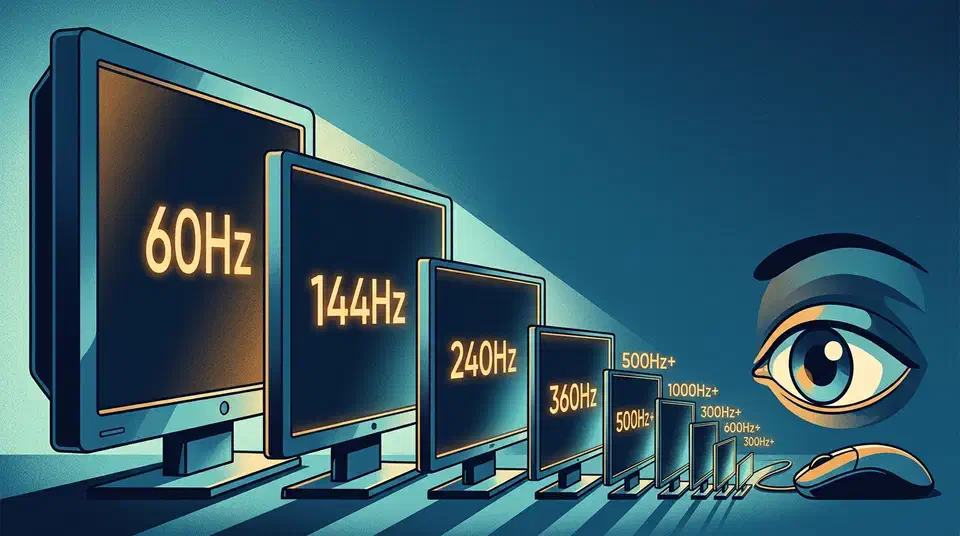
Refresh rate input lag above 360Hz keeps shrinking, but each step now saves well under a millisecond. Moving from 360Hz to 500Hz trims real center-screen input lag by about 0.39ms, while the frame-window math gives only 0.69 to 0.78ms per step. Above 360Hz, your mouse, CPU, and game engine decide the felt delay.
Key Takeaways
- Past 360Hz, each refresh jump saves well under one millisecond.
- Going 360Hz to 500Hz cut real input lag by about 0.39ms in testing.
- The big win is 60Hz to 144Hz, which alone drops almost 10ms.
- Above 360Hz, your mouse, CPU, and game usually decide the lag.
- Most players cannot tell 360Hz from 480Hz in a blind test.
How much does refresh rate cut input lag above 360Hz?
Refresh rate sets how often a screen can paint a new image. The time between refreshes shrinks fast at first, then flattens. By 360Hz the gap is down to 2.78ms, and each step past it trims only a fraction of a millisecond. Those are the raw display numbers, before the rest of your system gets involved.
| Refresh rate | Time per refresh | Best-case gain vs 360Hz |
|---|---|---|
| 60Hz | 16.67ms | - |
| 144Hz | 6.94ms | - |
| 240Hz | 4.17ms | - |
| 360Hz | 2.78ms | baseline |
| 480Hz | 2.08ms | 0.69ms |
| 500Hz | 2.00ms | 0.78ms |
| 540Hz | 1.85ms | 0.93ms |
| 720Hz | 1.39ms | 1.39ms |
The measured gain is smaller still. A review site clocked about 0.39ms lower minimum center-screen input lag going from 360Hz to 500Hz, with 360Hz already flooring near 1.39ms of minimum tested input lag. So refresh rate keeps cutting display timing above 360Hz, but the savings shrink to a fraction of a millisecond.
Why the gains collapse past 360Hz
The curve is front-loaded. Jumping from 60Hz to 144Hz alone cuts almost 10ms from the refresh window, and 144Hz to 240Hz still saves about 2.77ms. Those are whole milliseconds a player can feel across the desktop and in every game.
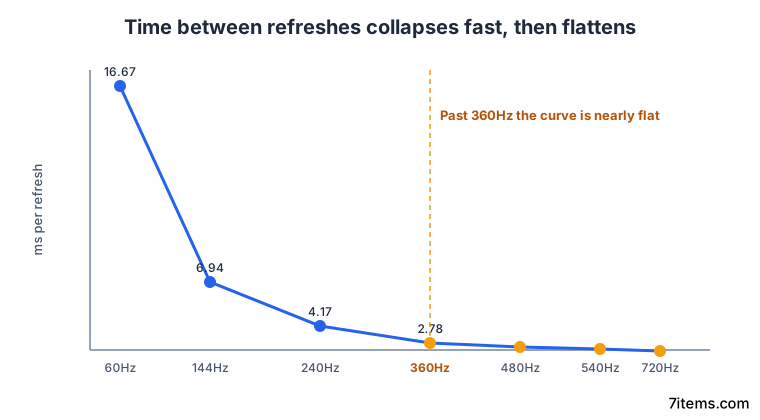
Above 360Hz you are sanding down a delay that is already tiny. So the 500Hz jump over 360Hz feels nothing like the 144Hz jump over 60Hz, even though the marketing math lines the numbers up as if it did.
Even the monitor maker behind these figures concedes the ceiling, though they sell fast panels for a living.
Above 360Hz, input-lag improvements get real but very small. The monitor refresh window keeps shrinking, yet each jump saves fractions of a millisecond unless the whole gaming system can feed the display fast enough.
Smoother is not the same as faster
Marketing folds two claims into one: that a higher refresh looks smoother, and that it wins more games. The two claims are different, and they stop being true at different points.
Research cited by KTC finds perceived visual smoothness keeps improving up to 500Hz, so the “looks smoother” side holds higher. Competitive first-person-shooter results, though, tend to level off after 360Hz. The win-rate payoff flattens well before the smoothness does.
Most gamers cannot reliably tell 360Hz from 480Hz in a blind test, and the real gap is about 0.69ms per refresh. The KTC comparison of 360Hz and 480Hz matches what real upgraders report: 60Hz to 144Hz is instantly obvious, while 240Hz and 360Hz jumps are visible but hard to justify on price for most players.
What actually limits your latency above 360Hz
Once the display gain drops under a millisecond, other parts of the chain take over, starting with frame rate. A 500Hz panel fed 180 FPS has no new frame to show on most refresh cycles, so the extra Hz just sits idle.
Games also go CPU-bound at the top end. KTC’s upgrade account shows a flagship GPU and a high-end CPU still struggling to hold 200 FPS in popular shooters on a 360Hz panel, and one tactical shooter did not consistently clear 250 FPS. The processor and game engine cap the frame rate long before the monitor does.
Sync and queue behavior swamp display timing too. Controlled testing showed about 59 to 61ms of latency with vertical sync off, versus about 102 to 103ms with in-game vertical sync, while adaptive sync landed near 59 to 60ms. That swing dwarfs the last 0.69ms of refresh window. So above 360Hz, your sync mode and frame rate govern the felt latency far more than the panel does. On consoles the same sync question splits by cable, since the PS5 and Xbox reach VRR through different HDMI ports .
Who should still buy above 360Hz?
A panel above 360Hz makes sense mainly for esports players who already hold 400 to 600 FPS in their main game. That usually means a fast CPU, low settings, and a 1000Hz-or-higher polling mouse feeding the display. For that narrow group, 480Hz or 500Hz can shave real scan delay.
For most players, 240Hz to 360Hz is the practical high-performance range. A stable 240Hz or 360Hz OLED often feels better than a 500Hz panel starved of frames. Frame pacing beats headline Hz: a steady 144Hz near 140 FPS can feel smoother than a 240Hz panel bouncing between 95 and 180 FPS.
The top end also carries tradeoffs. Buyers face fewer panel choices, higher prices, lower resolution, smaller sizes, and more aggressive overdrive that can add inverse ghosting. Chase a stable frame rate and a low-lag setup first, then treat the jump above 360Hz as a final tune rather than the foundation.