

At 5.00GHz the Dimensity 9600 Pro trades heat for speed


The Dimensity 9600 Pro posts a leaked Geekbench 6 single-core score near 4,300, running two prime cores at 5.00GHz. That is 24.93% ahead of the Snapdragon 8 Elite Gen 5 for Galaxy. However, the clock drops under sustained load, so the lead lives inside a benchmark shorter than a minute.
Key Takeaways
- Test samples of the Dimensity 9600 Pro hit up to 4,300 single-core in Geekbench 6.
- Two prime cores now run at 5.00GHz instead of one.
- That puts it about 25% ahead of the Gen 5 for Galaxy on single-core.
- The 5.00GHz peak fades under long workloads, so games see less of it.
- Test chips often run harder than the phone you can buy.
What the leaked Geekbench 6 scores show
The numbers come from a Weibo tipster, reported by Wccftech . An engineering sample of the Dimensity 9600 Pro scored 4,200 to 4,300 single-core and 12,000 to 12,500 multi-core. These runs sit slightly above earlier tests of the same chip, which hints that MediaTek is still tuning it.
At the top of that range, the lead over today’s flagships is real. The 9600 Pro runs 24.93% faster single-core than the Snapdragon 8 Elite Gen 5 for Galaxy. It also beats the A19 Pro by 9.58% and its own predecessor, the Dimensity 9500, by 21.40%.
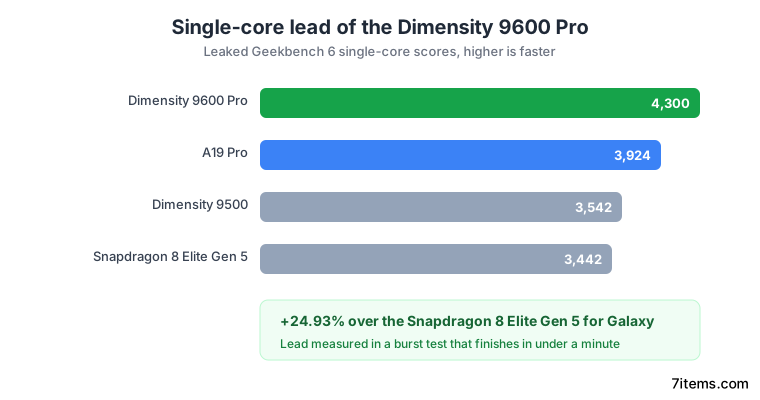
The clock speed, in the bottom row of the table, is where the gap starts.
| Geekbench 6 (leaked) | Dimensity 9600 Pro | Dimensity 9500 | A19 Pro | Snapdragon 8 Elite Gen 5 for Galaxy |
|---|---|---|---|---|
| Single-core | 4,300 | 3,542 | 3,924 | 3,442 |
| Multi-core | 12,500 | 10,830 | 10,070 | 10,792 |
| Max clock | 5.00GHz | 4.21GHz | 4.26GHz | 4.74GHz |
| 9600 Pro single-core lead | n/a | +21.40% | +9.58% | +24.93% |
| 9600 Pro multi-core lead | n/a | +15.42% | +24.13% | +15.83% |
The 9600 Pro clocks a full 260MHz higher than the next chip on the list. That headroom is what buys the single-core win.
Why two 5.00GHz cores cost more than twice one
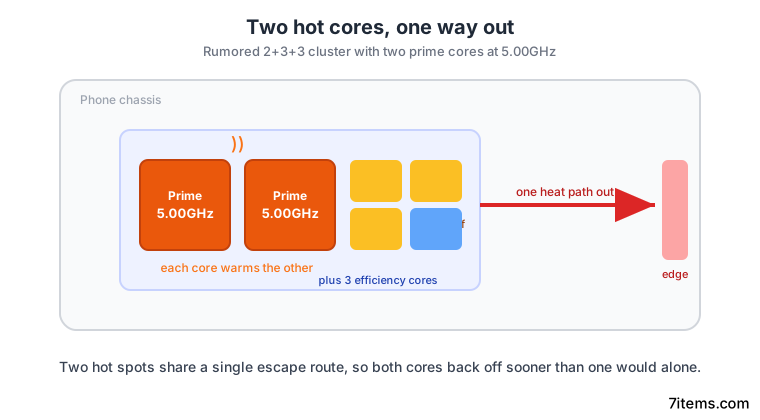
MediaTek changed the CPU layout to earn these scores. The chip now runs two prime cores at 5.00GHz instead of one, inside a rumored 2+3+3 cluster. Two fast cores sound like a clean doubling of speed, but the real cost runs much higher.
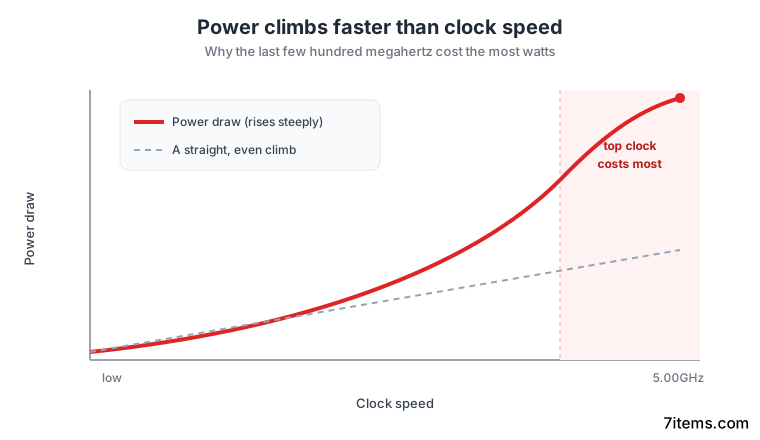
Power draw climbs faster than clock speed, so the last few hundred megahertz make the extra watts pile up out of proportion. That means the top of the clock range is the expensive part, and now the chip pays that cost twice.
Heat follows the power. Two cores at 5.00GHz create two hot spots, inside a phone that has one path for heat to escape, out through the chassis. Heat spreads before it leaves, so the second core warms the first, and both back off sooner than either would alone. The chip chases short bursts of speed, while the phone around it is tuned to stay cool over time.
Burst score against sustained speed
A Geekbench 6 run finishes in well under a minute. That short window is exactly how long a 5GHz phone core can hold its top clock before heat forces it down. The leaked score captures that peak, well above the speed a warm phone can hold.
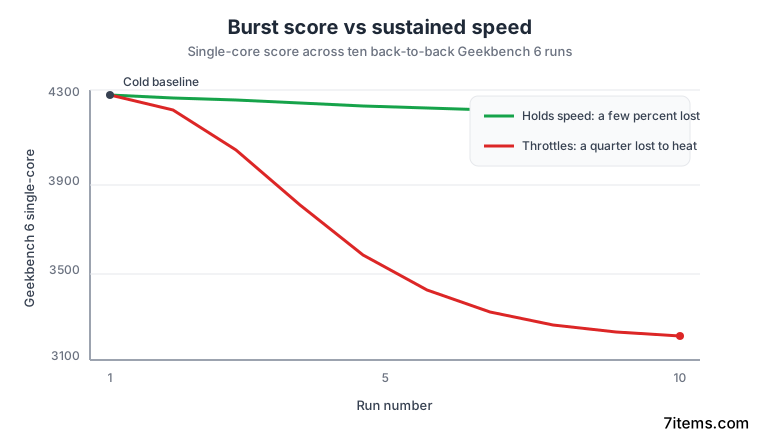
Digital Chat Station, the tipster Wccftech credits, reports that the 5.00GHz frequency clocks down under sustained load to cut power draw. The peak shows up in short tests and fades in long ones.
Most of what people do with a phone runs past that window. Gaming, video export, long camera sessions and navigation all sit on the sustained clock, not the burst. The 24.93% figure describes the first thirty seconds of use, and the tenth minute looks very different.
Engineering samples are often set up to run beyond commercial limits, so a shipping phone can score lower than this leak. The other upgrades look strong regardless: the chip pairs an ARM Magni GPU with LPDDR6 memory and UFS 5.0 storage. On the Qualcomm side, the Adreno 850 GPU score tops 1.85 million in its own leaked run.
The leaks even disagree on memory. Wccftech lists LPDDR6 for the 9600 Pro, while a separate Gizmochina comparison lists LPDDR5X for the standard Dimensity 9600. Both are leaks built on the same TSMC 2nm process, so treat the spec as unsettled until launch.
How do I test my own phone for throttling?
You can measure this on the phone in your pocket. The number worth having is the shape of the curve across repeated runs, not any single score. A phone that holds its speed and one that collapses can post the same first result.
Conditions move the outcome, so hold them steady. Room temperature, case on or off, screen brightness and background sync all change the reading. Keep them fixed and the runs stay comparable.
A small drop is normal, and a phone that loses a few percent across a loop is fine. One that loses a quarter is running out of heat path, and that is the story a single leaked score will never tell you.
How to measure sustained CPU speed with a Geekbench loop
Run one benchmark over and over under fixed conditions, then plot the scores. The gap between the first run and the last is the speed your phone keeps once it warms up.
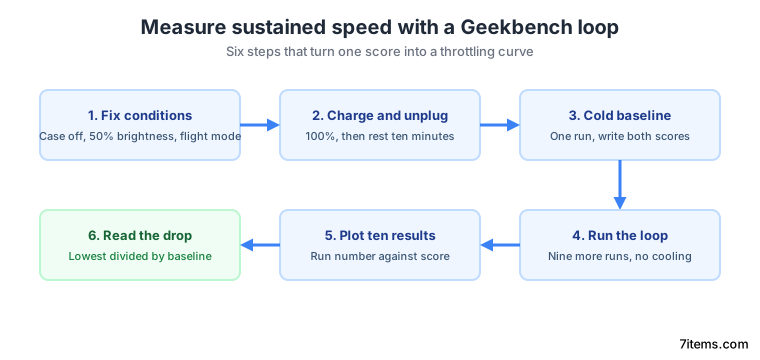
Fix the test conditions
Note the room temperature and remove the case. Set screen brightness to 50%, turn on aeroplane mode, and close background apps. Each run should start from the same state.
Charge to full and unplug
Charge the phone to 100%, then unplug it. Let it sit for ten minutes so heat from charging clears before the first run.
Record a cold baseline
Run Geekbench 6 once and write down the single-core and multi-core scores. This is the number that matches a leak headline.
Run the loop
Run the same benchmark nine more times, back to back, with no cooling break. Write down both scores after each run.
Plot the ten results
Put run number on the horizontal axis and score on the vertical axis. Draw one line for single-core and one for multi-core.
Read the drop
Divide the lowest score by the cold baseline. That percentage is what your phone keeps under sustained load, and it is the number worth comparing across phones.