

96Gbps arrives on HDMI 2.2 through the new Ultra96 cable

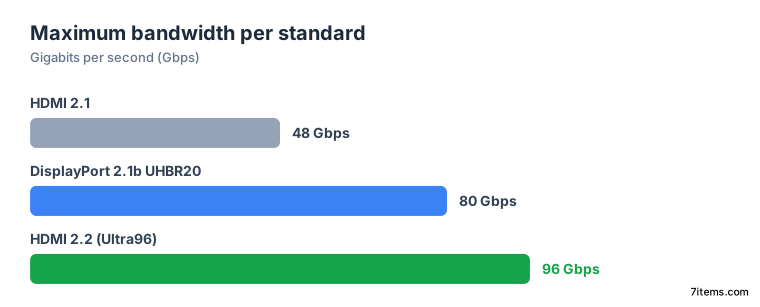
An HDMI 2.2 Ultra96 cable is the label to look for if you want the full 96Gbps the new standard allows. That ceiling edges past DisplayPort 2.1b UHBR20’s 80Gbps top speed. For a desktop, it means uncompressed 4K at 240Hz in 12-bit color, all without touching the 16K resolution the headlines chase.
Key Takeaways
- HDMI 2.2 doubles the top speed from 48Gbps to 96Gbps.
- Only a certified Ultra96 cable carries the full 96Gbps.
- HDMI now runs faster than DisplayPort’s 80Gbps top speed.
- The real prize is uncompressed 4K at 240Hz, not 16K.
- Old cables and old ports still work, just slower.
What is an Ultra96 HDMI cable?
Ultra96 is a feature name that arrived with HDMI 2.2. It tells a buyer that a product supports the standard’s maximum bandwidth, per the HDMI Forum’s 2.2 specification release . The Ultra96 HDMI Cable handles up to 96Gbps and every HDMI 2.2 use. The older Ultra High Speed HDMI Cable tops out at 48Gbps.
The badge covers more than one speed, though. Makers are told to use the Ultra96 name for 64Gbps, 80Gbps, or 96Gbps support under HDMI 2.2. So the label covers a family of tiers, and the device spec still decides which one you get.
Every Ultra96 cable sits inside the HDMI Cable Certification Program. Each model length is tested, certified, and carries a Certification Label. That label does real work, because the HDMI Forum lets makers claim HDMI 2.2 compliance without enforcing the bandwidth rule, as Tom’s Hardware notes. The Ultra96 mark on the cable is the check that holds.
How does HDMI 2.2 compare to DisplayPort 2.1b UHBR20?
HDMI 2.2 raises the ceiling from HDMI 2.1’s 48Gbps to 96Gbps, using next-generation HDMI Fixed Rate Link technology. DisplayPort 2.1b UHBR20 tops out at 80Gbps. HDMI 2.2 now holds the higher maximum, and it carries uncompressed 8K at 60Hz where UHBR20’s ceiling does not.
| Standard | Max bandwidth | Headline formats |
|---|---|---|
| HDMI 2.1 | 48Gbps | 4K at 120Hz, 8K at 60Hz with compression |
| HDMI 2.2 | 96Gbps | Uncompressed 8K at 60Hz, 4K at 240Hz |
| DisplayPort 2.1b UHBR20 | 80Gbps | Uncompressed 4K at high refresh, no 8K at 60Hz |
A standard’s ceiling says little about any single port. Vendors ship partial builds, so the number on the box is a maximum the silicon may never reach.
AMD shows this in its own lineup. Only its Radeon Pro cards support the full DisplayPort 2.1b UHBR20 standard today. The RX 9000 series is capped at 54Gbps, well under the 80Gbps maximum. Both sources leave one question open: whether HDMI 2.2 monitors will run 4K at very high refresh uncompressed, or still lean on Display Stream Compression.
What 96Gbps gets you on a desk
The press figures are the eye-catching part: up to 12K at 120Hz and 16K at 60Hz, both with chroma subsampling. They miss what a desk needs. No monitor a buyer can get in 2026 comes near 12K or 16K, and subsampled chroma is the exact compromise a desktop user wants to avoid.
The useful number is uncompressed full chroma. HDMI 2.2 carries 8K at 60Hz in 4:4:4, plus 4K at 240Hz in 4:4:4 at 10-bit and 12-bit color. 4:4:4 means every pixel keeps its own color data. That is what holds small text and thin interface lines crisp on a desk, where you sit close to the screen.
High-refresh 4K panels exist now. The extra bandwidth is what lets them run at full color depth with no compression anywhere in the chain. So judge an HDMI 2.2 port by whether it carries your panel’s native format uncompressed, and ignore the biggest resolution in the press release.
Will HDMI 2.2 break my existing gear?
No. HDMI 2.2 is backwards compatible in both directions. New cables work in older ports, and older cables work in new ports.
The result is the lowest common denominator. Plug an Ultra96 cable into a TV with HDMI 2.1, and you get HDMI 2.1 features and speeds, with nothing broken. There is no reason to delay buying an Ultra96 cable, and none to rush one either, unless a 2.2 source and a 2.2 display both sit on the desk.
That same rule carries a risk. A chain runs at its weakest link, so a single uncertified cable can cap the whole path. The downgrade is silent, with no error message to warn you.
The lip-sync fix hiding in the spec
HDMI 2.2 also adds a Latency Indication Protocol, or LIP, to improve audio and video sync. It targets multiple-hop setups: signal routed through an audio video receiver or a soundbar, where each device adds delay. Tom’s Hardware frames the payoff as fewer lip-sync problems across large home theatre chains with many speaker channels, receivers, and projectors.
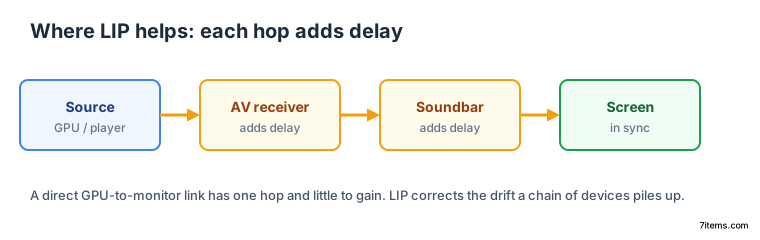
A monitor plugged straight into a GPU has one hop and little to gain. Neither source publishes a millisecond figure for how much drift LIP removes.
When will HDMI 2.2 monitors and cables ship?
The HDMI Forum published version 2.2 of the specification in 2025, introducing the Ultra96 name alongside it. Tom’s Hardware expected the first HDMI 2.2 devices within a couple of quarters of that release, and named AMD’s upcoming UDNA GPUs as likely early adopters. An earlier leak complicates that guess: it pointed to limited HDMI 2.2 support on UDNA, capping maximum bandwidth on most models.
So a simple buying rule holds up better than a ship date. First, confirm both ends claim HDMI 2.2. Then look for the Ultra96 certification label on the cable. Last, read the device’s stated tier of 64, 80, or 96Gbps. What stays unknown for now is which specific monitors ship HDMI 2.2 ports first, and at what refresh ceilings.