

AI upscaling on LG's UltraGear evo aims at a true 5K look

LG’s 5K AI upscaling runs inside the monitor, on a built-in processor, after your graphics card has already finished the frame. Three of the five 2026 UltraGear evo models carry it. Because it only ever sees finished pixels, it can clean up edges and gradients but cannot rebuild detail the game never rendered.
Key Takeaways
- LG’s 5K AI upscaling happens inside the monitor, downstream of your graphics card.
- Only three of the five 2026 UltraGear evo models include it.
- It smooths edges and gradients but cannot invent detail that was never drawn.
- The feature needs a 1080p or better source, and stays off below that.
- Leave it on for video and handhelds, off for competitive shooters.
What LG’s 5K AI upscaling is and where it runs
A processor inside the monitor takes whatever signal arrives over the cable and scales it to the panel’s native resolution in real time. LG describes it on its CES 2026 UltraGear evo page as enhancing content from any device, with no GPU upgrade needed. That last part is true, and it is the real selling point.
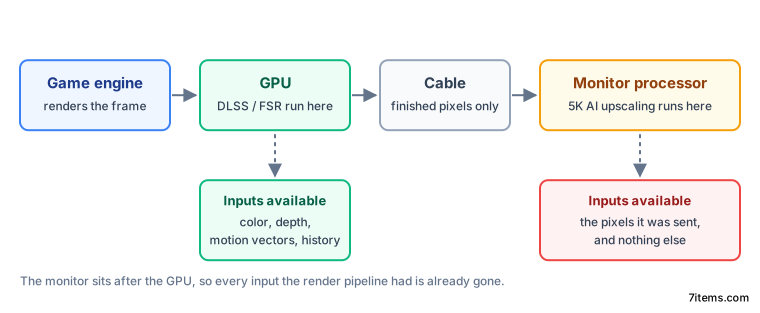
The monitor’s processor only starts work once the GPU has finished the frame and the cable has carried it across.
The monitor receives finished pixels and nothing else. It never gets the depth map or the motion data that tells an upscaler what the camera did between frames.
LG says AI Upscaling needs at least an FHD source signal, per VideoCardz’s coverage of the lineup . It will not run on anything below 1080p, which rules out the classic use case of rescuing a low-resolution stream.
Which models carry the feature
The pitch reads as a lineup-wide feature, but the spec sheets disagree.
| Model | Native resolution | AI upscaling |
|---|---|---|
| 39GX950B | 5K2K (5120x2160) OLED | 5K2K AI Upscaling |
| 27GM950B | 5K (5120x2880) MiniLED | 5K AI Upscaling |
| 32GX870B | 4K (3840x2160) OLED | 4K AI Upscaling |
| 52G930B | 5K2K (5120x2160) 21:9 | None |
| 27GX790B | QHD (2560x1440) OLED | None |
If the feature is why you are shopping, check the model number rather than the family name. The 52-inch 52G930B , for one, skips upscaling entirely.
How is monitor upscaling different from DLSS?
DLSS and FSR sit inside the render pipeline, where the game engine can hand them information that never reaches a cable. NVIDIA’s DLSS programming guide requires depth, motion vectors and render-resolution color as inputs. AMD’s FSR upscaler documentation asks for the same set, plus the previous frame.
Motion vectors do most of the heavy lifting, telling the upscaler where each pixel was in the last frame so it can carry real detail forward instead of guessing. Depth tells it which surfaces are in front of which. An in-monitor upscaler has neither.
With one input, the monitor can still do useful work:
- Edge reconstruction, so diagonal lines look less stepped.
- Gradient smoothing, which cuts banding in skies and dark scenes.
- Noise reduction on compressed video, where the source is soft anyway.
Geometry detail that was never rendered stays missing. Thin lines, wires, fences and distant foliage will still shimmer in motion, because stabilizing those needs motion data. Temporal accumulation, the trick that makes DLSS look better than the frame it started from, is off the table here.
| GPU-side (DLSS, FSR) | In-monitor (UltraGear evo) | |
|---|---|---|
| Inputs available | Color, depth, motion vectors, prior frames | Finished pixels only |
| Added display latency | None at the panel | One processing pass, unpublished |
| Works with any source | No, needs engine support | Yes, above 1080p |
| Works with any GPU | No, vendor and generation limits | Yes, and with consoles and handhelds |
| Can recover unrendered detail | Yes, within limits | No |
DLSS and FSR are rendering shortcuts, while the UltraGear feature is display processing sold under the same two words.
The latency cost is still unpublished
Every processing pass inside a monitor costs time. The image has to be buffered, analyzed and rebuilt before it reaches the panel.
LG hasn’t published a figure, and neither the CES page nor the lineup coverage gives a millisecond number for the pass. Treat any number quoted elsewhere with suspicion.
At 165Hz, a single frame lasts about 6ms. If the upscaler holds one frame, that is roughly a sixth of the input lag budget a competitive player cares about. At 330Hz in Dual Mode, one frame is about 3ms.
You can measure it yourself without lab gear. Set a phone to slow-motion video, film your mouse and the screen together, and count frames from click to reaction. Run the test twice, once with upscaling on and once off, and compare. The difference between the two runs is the real cost of the feature.
LG has not said whether upscaling can be switched off per input. That is important if a console shares the monitor with a PC. It’s also unclear whether it kicks in at high refresh rates and in HDR, or only below some limit.
Should you leave it switched on?
Switch it off for the desktop and for reading text. Upscaling only applies to content below the panel’s native resolution, and your desktop already runs at native. There is nothing to reconstruct, and any processing pass is a chance to soften text. A genuinely dense native panel makes the whole feature moot, which is the pitch behind LG Display’s 220 PPI 5K OLED panel .
Streaming video below 4K is where in-panel processing has always earned its place, so turn it on there. Compressed video is soft and noisy to begin with, and edge cleanup plus noise reduction help. A few milliseconds of added lag make no difference during a film.
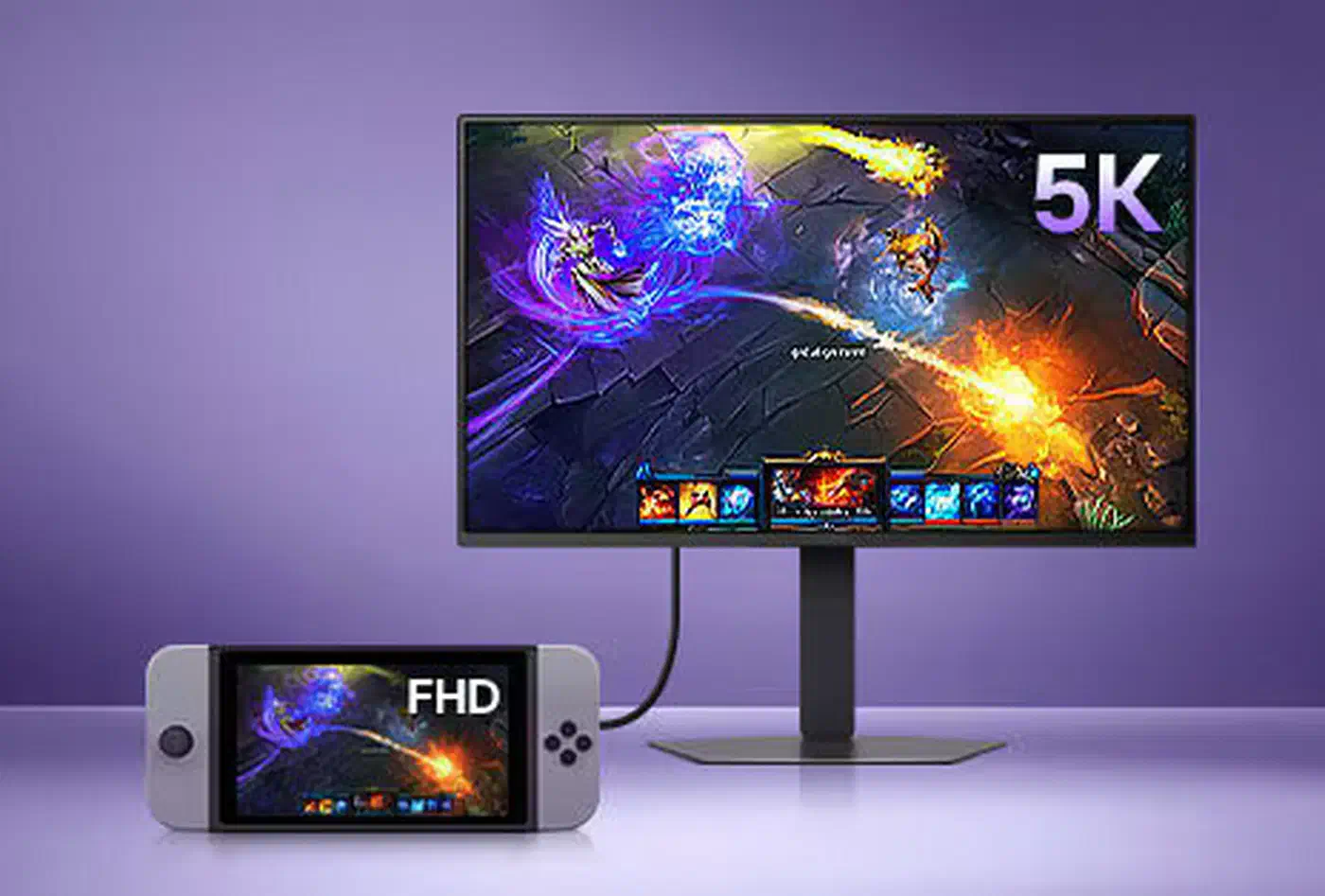
Leave it on for handhelds and consoles too. LG’s own demo pairs the monitor with a handheld, and that is a fair choice: a handheld puts out a fixed low resolution with no upscaler of its own, so the monitor is the only thing in the chain that can do the job.
For single-player games at a lower render resolution, try both and judge on motion rather than stills. Pause a screenshot and the upscaled version usually looks sharper. Walk past a fence and you will see whether the shimmer got worse.
Competitive shooters get it switched off. An unpublished latency cost buys you something you would never notice mid-match, which is a bad trade. Use the panel’s Dual Mode to drop resolution and raise refresh instead. On a 32-inch OLED that trade lands at 1080p at 480Hz , a quarter of the pixels for double the frames.
Treat it as a nice inclusion rather than a reason to buy. If you were already choosing a 27GM950B for its 2,304 dimming zones or a 39GX950B for its Tandem OLED panel , the upscaler is a small bonus on top. If it is the headline that pulled you in, expect less than the name promises, because the pipeline it runs in caps what it can do.