

The Halot X1 moves the resin vat, not the build plate


The Piocreat Halot X1 moves the resin vat instead of the build plate. Its plate stays locked while the vat, 16K screen and light engine travel underneath, so there’s nothing to level. Three hands-on reviews, from 3DWithUs, 3DWork and FauxHammer, agree the mechanism works but split on sharpness, and a fixed-power honeycomb light explains why.
Key Takeaways
- The Halot X1 keeps the build plate still and moves the vat and screen.
- There’s no leveling step, and tall prints stay steady.
- Its 16K screen matches rivals, but the light behind it runs hotter.
- One reviewer got crisp prints, another got soft, swollen detail.
- It shines on big models and busts, while tiny miniature detail suffers.
How the Halot X1’s moving-vat, fixed-plate design works
On a normal resin printer, the build plate dips into the vat. After every layer, it lifts to peel the cured slice off the film. On the Halot X1, the plate slides into a solid mount at the top of the machine and locks there when a print starts. Then the resin vat, the LCD and the light engine ride up and down underneath it on two motors.
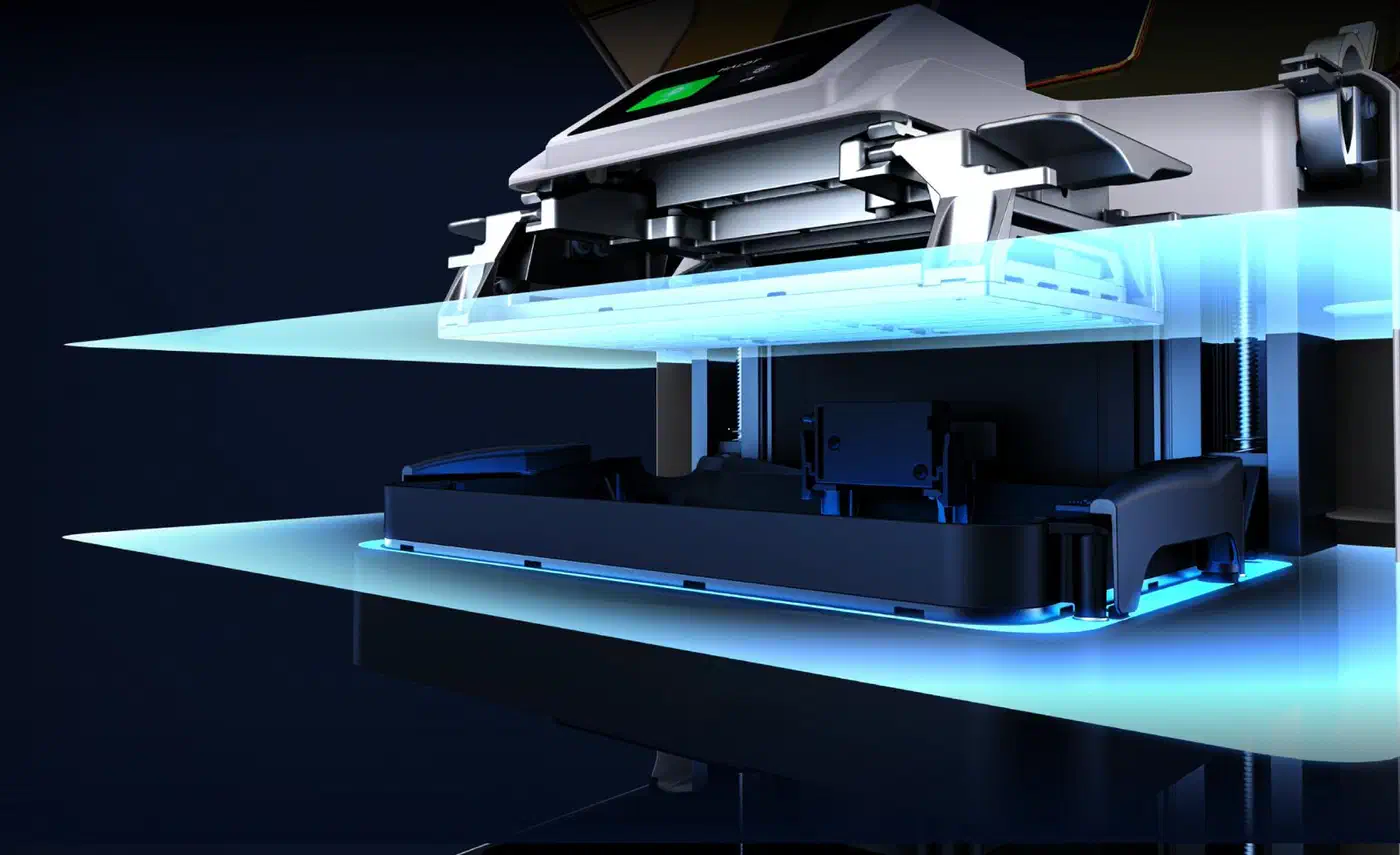
Because the plate never moves, it can’t drift out of square with the screen. Piocreat sets that alignment at the factory, so setup skips leveling entirely. 3DWithUs’s hands-on test credits the layout with a stiffer platform, shorter peel distances and more even layer separation. Its tallest statue parts showed no sign of Z-wobble, the faint ridging that a shaky plate leaves on tall prints.
With no adjustment, a printer that ships perfectly square feels effortless, and one that ships slightly off has no screw to turn. 3DWork’s review unit printed without leveling too, but its parts came out 0.1 to 0.3 mm shorter than designed. That won’t show on a statue, yet it can spoil parts that need to fit together.
3DWork also wished for adjustable feet. A fixed plate trusts the machine to sit on a level surface, and the X1 has no way to correct for a sloped desk. The leveling-free design held up in testing, but nobody has shown yet that every retail unit ships as square as the review units did.
Is the Halot X1 a 16K printer?
On paper, yes. The 10.1-inch mono LCD packs 15,120 x 6,230 pixels. Each pixel covers about 14 x 19 microns, so the pixels are slim rectangles rather than squares.
The weak point is the light behind the screen. Most sharp modern resin printers use a COB light source, one dense LED chip whose light often passes through a lens that straightens it. The Halot X1 uses a honeycomb matrix of separate LEDs instead. 3DWork calls COB unworkable with this motion system, and FauxHammer suspects the moving light engine leaves too little height for one.
A matrix of separate LEDs gives a less tightly controlled beam, so light spreads past each pixel’s edge. That swells thin features and fills in small recesses. FauxHammer could even see the individual UV emitters glowing through the screen during exposure.
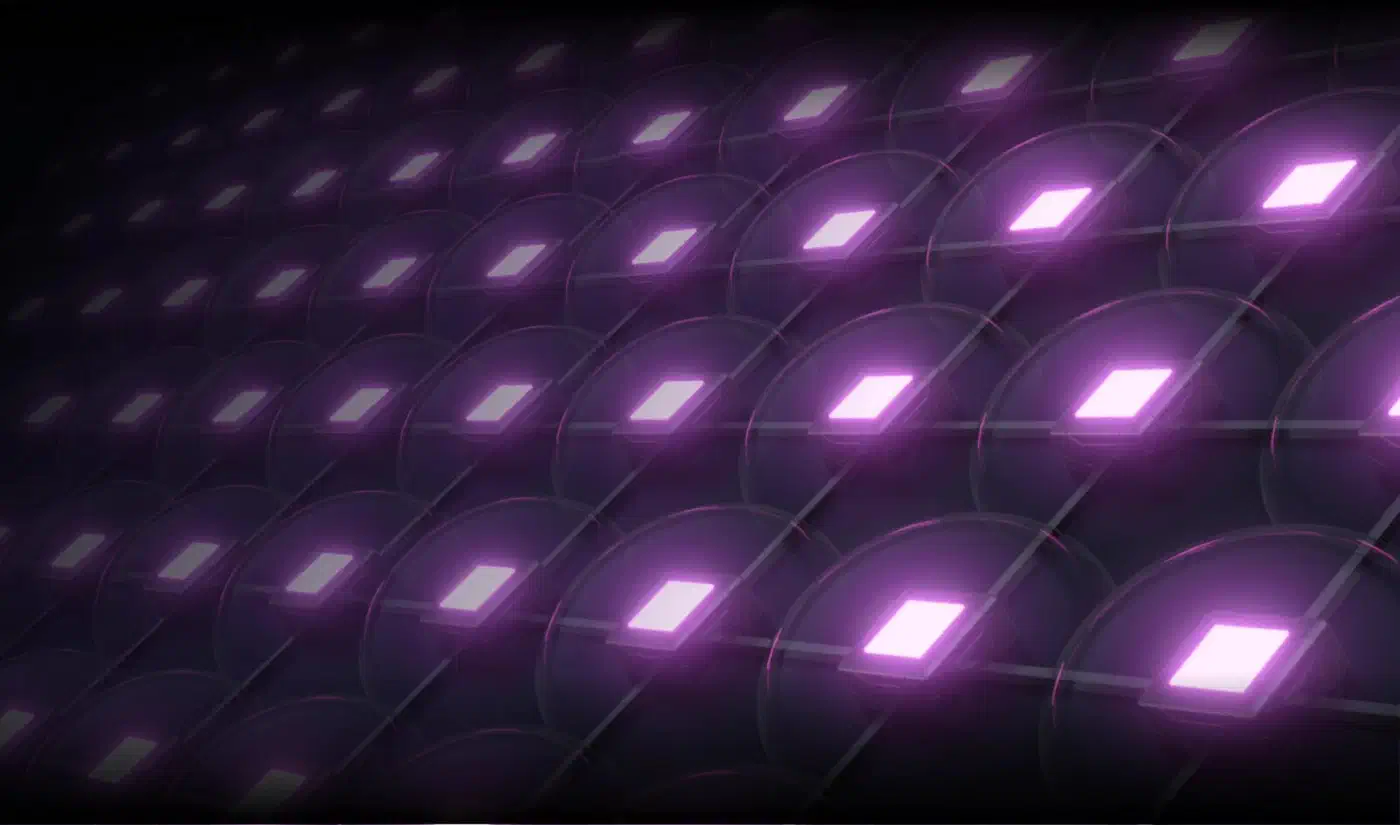
High power widens the spread further. FauxHammer measured 5.9 to 6.9 mW/cm² across the build area, where many rivals run at 3 to 4 mW/cm². Piocreat’s own spec sheet rates the X1 at 6,500 µW/cm², which is 6.5 mW/cm². That’s close to twice the light many competitors use, with no way to turn it down.
The FAQ on Creality’s X1 product page lists an owner complaint: 6,500 µW/cm² is too strong for third-party resins, and other 16K printers allow adjustment. Creality’s answer is that the setting stays locked to keep the machine simple for beginners, and it recommends official resins.
Piocreat’s counter is a 92-zone “intelligent exposure” system. The LED board splits into 92 zones, and only the zones under the model and supports switch on. Piocreat says this trims stray light, lowers heat and stretches LCD life, which the Creality wiki’s hardware FAQ rates at about 3,000 hours. FauxHammer doubted the lifespan gain, since most prints sit mid-plate and keep wearing the same zones anyway.
Despite the 16K headline, the output can look more like what you’d expect from a lower-resolution machine.
The closest rival is Elegoo’s Saturn 4 Ultra 16K , with its light specs taken from 3DWork’s Saturn 4 Ultra 16K review .
| Spec | Halot X1 | Saturn 4 Ultra 16K |
|---|---|---|
| Screen resolution | 15,120 x 6,230 | 15,120 x 6,230 |
| Pixel size | 14 x 19 µm | 14 x 19 µm |
| Build volume | 211.68 x 118.37 x 200 mm | 211.68 x 118.37 x 220 mm |
| Light source | Honeycomb LED matrix, 92 zones | COB with Fresnel lens |
| Rated UV power | 6.5 mW/cm², fixed | 5 mW/cm² |
| Leveling | None needed, fixed plate | Automatic |
| Resin heating | Optional AFU warms resin on the way in | Vat held at 30°C |
The two machines share a screen, so any sharpness gap between them comes from the light behind it.
Do the Halot X1’s prints look sharp?
That depends on who you ask and what you print.
| Review | Resins | Models printed | Sharpness verdict | Score |
|---|---|---|---|---|
| 3DWithUs | Piocreat 16K, Anycubic Standard+ | Kratos statue, two Famine Horseman statues, 75 mm Enika | Crisp throughout, no Z-wobble | 4.8 / 5 |
| 3DWork | Piocreat HALOT 16K Standard | Predator, Hellboy | Predator excellent, Hellboy slightly blurred | 3.5 / 5 |
| FauxHammer | Not stated | Calibration tests, figures | Bloated and overexposed | No score |
3DWithUs saw crisp detail
Armor textures, chain links, stitching and fabric folds all came out crisp. Even the fingers and the knives strapped to Enika’s leg resolved cleanly.
FauxHammer saw bloat
FauxHammer’s prints looked bloated and overexposed, even after it cut exposure to about half a second at 30-micron layers. At that setting some thin parts, including one model’s leg, failed outright. Its calibration tests also couldn’t open details that other 16K printers handle. A sword meant to pass through a skull and the hollow of a beer mug both stayed too overexposed to open.
3DWork landed in between
3DWork had printed the same Hellboy on other machines, which made its blurred textures easy to spot. It called the effect subtle and occasional, and it still praised the X1’s reliability after printing full plates without a single failure.
How the three verdicts fit together
Large statues and chunky parts came out well for all three reviewers. They disagree on the smallest miniature details, where extra light spreading past pixel edges fattens thin features. Anti-aliasing still works, so the cost is soft edges on fine detail.
The convenience features that stand out
Every reviewer praised the hardware around the print engine.
Twist-release build plate
The plate’s surface is cut into grooves. Turning its side handles shifts them to break cured resin loose and push models off. On large prints it works very well, turning removal into a twist and a lift.
Small parts may not release cleanly and can crack at the base. The grooves leave marks on anything printed flat on the plate, and resin collects in them, so cleaning takes longer.
Vat levers that block a bad start
Two large compression levers clamp the vat in place, with no screws or clips. If they’re left open, the lid physically can’t close, so the printer refuses to start a job. The vat’s pour spout also earned praise from FauxHammer as one of the better ones on any resin printer.
The optional AFU auto-feed unit
The AFU is sold separately from the base printer. It pumps resin from a bottle through a heater and into the vat, then tops the vat up during long jobs. 3DWithUs never had to refill mid-run across multi-plate statues. With RFID-tagged Piocreat bottles, the printer also reads the resin type and loads matching settings.
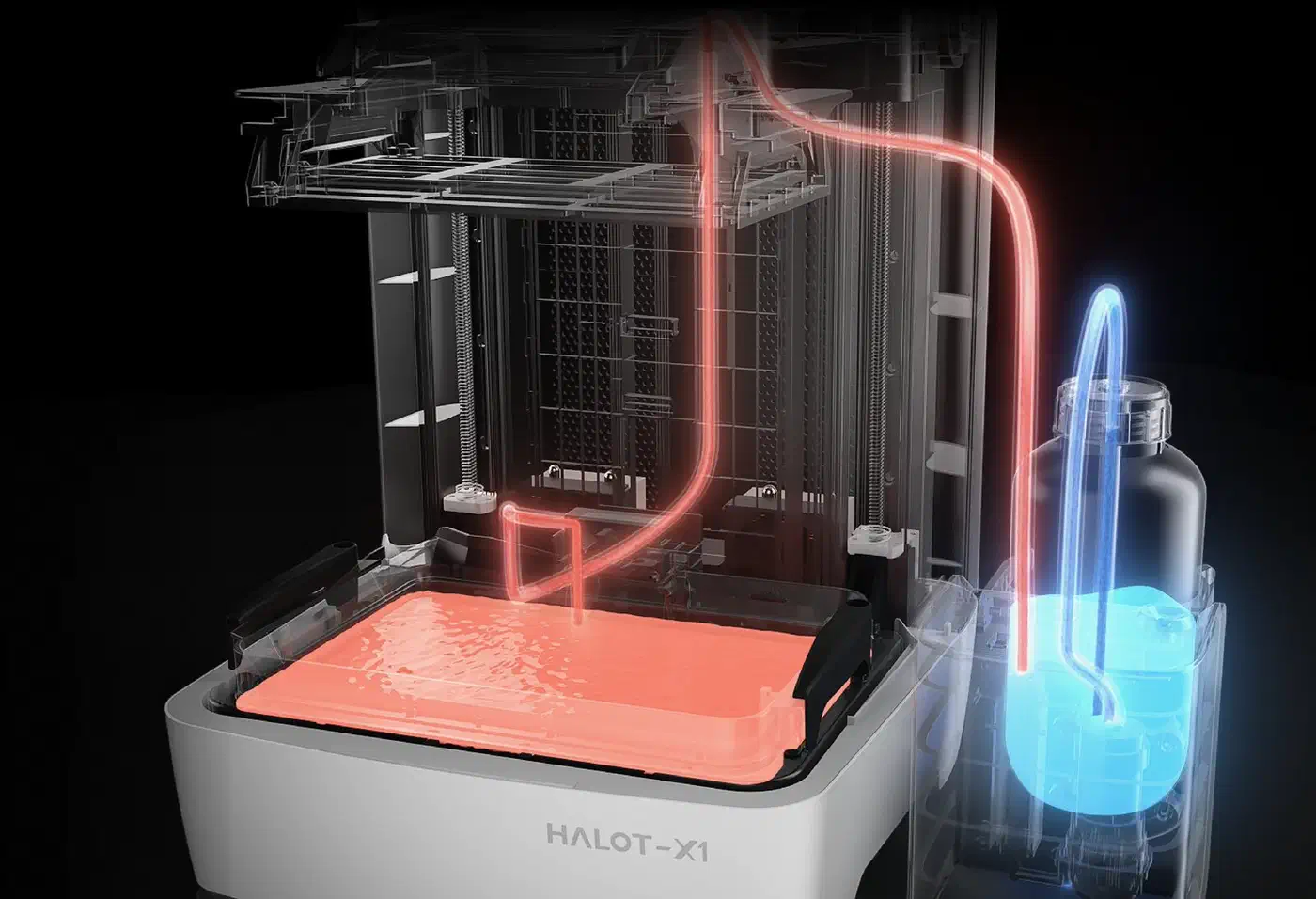
The AFU warms resin only as it flows in and doesn’t keep the vat warm. To reheat resin already in the vat, you pump it out and back again. FauxHammer found that cumbersome, and 3DWork noted the pump is slow and messy when switching resins. In a cold garage, that’s a weaker answer than a heated vat.
Small touches
- The USB port sits on top of the machine, away from resin drips.
- The footprint is only 344 x 331 mm, small for this build volume.
- The lid flips up and back in one motion.
Price, caveats, and who the Halot X1 is for
At launch, 3DWithUs listed the Halot X1 at $579 to $749, depending on the bundle. Creality’s store has since cut it to $469 for the printer alone and $499 with the AFU, down from a $629 list price.
The spec sheet stretches the screen size
Piocreat markets a 10.1-inch LCD, but the printable area measures closer to 9.6 inches diagonally. 3DWork did the math from the pixel count and pixel size, and FauxHammer called it spec inflation. The build volume figures are accurate, and only the headline screen size is padded with bezel.
The brand story is tangled
Piocreat’s founder was one of Creality’s co-founders, and the Halot resin line moved under the Piocreat name. Yet Creality’s own store and product page sell the X1. Earlier Halot printers had a mixed reputation: they brought fresh ideas but usually trailed rivals on results.
Software is the rough edge
HALOT BOX is a clean, beginner-friendly slicer. Still, the printer keeps just one file in memory. The file at the top left of the menu always prints next, whatever you think you picked. 3DWithUs found resin and time estimates unreliable. FauxHammer and 3DWork both hit a worse problem: the printer applied its own stored resin settings over the ones in the sliced file.
FauxHammer also wanted clear lift-speed controls, which the printer doesn’t offer. Creality’s FAQ at least says the vat follows an S-curve, moving slowly at the bottom and top of each lift and faster in between.
Who should buy it
The Halot X1 suits people who print busts, terrain, props and larger figures. It’s a harder sell if the finest miniature detail is the whole reason you want a 16K printer. Until Piocreat lets owners turn the light down, a COB machine like the Saturn 4 Ultra 16K is the safer bet for that job.